Kuwait Traffic Fine Payment Online – Complete 2025 Guide for Individuals & Companies
Paying traffic fines in Kuwait has become extremely simple and user-friendly thanks to the digital transformation introduced by the Ministry of Interior (MOI). Whether you are a resident, a Kuwaiti citizen, or a company owner, you no longer need to physically visit traffic departments or stand in long queues. Today, anyone can easily check and pay their Kuwait traffic fine online using three main methods: the MOI (Ministry of Interior) website, the Sahel government services app, or the official MOI mobile app. This complete 2025 guide explains all available online methods, step-by-step instructions, important notes, and frequently asked questions to help you complete the entire process within minutes.
1. Kuwait Traffic Fine Payment Online (MOI Website)
The official MOI website is the most commonly used platform for checking and paying Kuwait traffic fine online. It supports both individuals and companies, allowing payments using any valid debit or credit card. The service is available 24/7, making it one of the most convenient options.
Step-by-Step Guide to Pay Traffic Fines via MOI Website
Step 1: Visit the Traffic Violation Payment Portal
Go to the official MOI traffic violation payment service. From the homepage, select “E-Services” → “Traffic” → “Traffic Violations.”
Step 2: Select Your Beneficiary Category
Choose who the fines belong to:
- Individuals (Personal Traffic Fines)
- Company / Establishment (Business Vehicle Fines)
Step 3: Enter the Required Information
Depending on your selection, you may be required to enter:
- Civil ID number
- Company number
- Vehicle plate number
- Traffic file number
Always ensure the details are correct before proceeding.
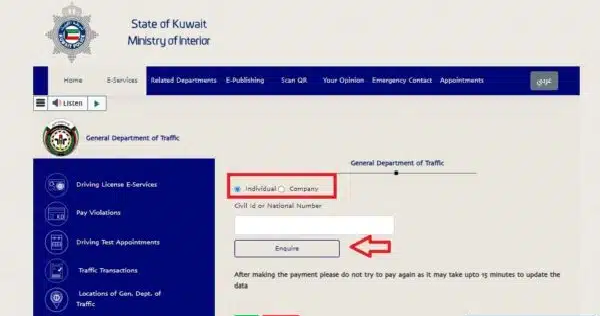
Step 4: Click “Enquire”
After clicking “Enquire”, the system automatically displays all unpaid traffic violations registered under your name or company.
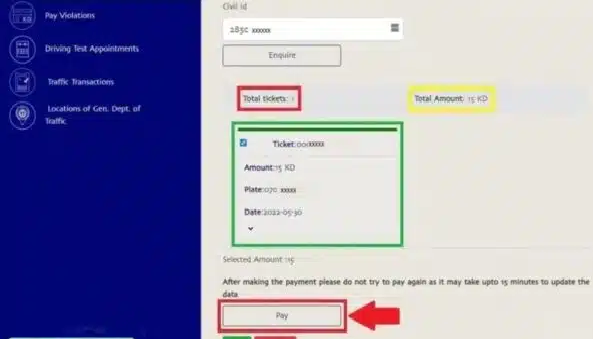
Step 5: Select the Violation You Want to Pay
A detailed list will appear showing:
- Date of violation
- Violation type
- Location
- Fine amount
Select the violations you want to settle.
Step 6: Click “Pay”
Once the violations are selected, click the “Pay” button.
Step 7: Enter Your Payment Details
You will be redirected to a secure payment gateway to enter your:
- Debit/Credit card number
- Expiry date
- CVV code
Step 8: Submit Payment
Click “Submit” to complete your payment. A confirmation message will appear, and your Kuwait traffic fine online will be updated instantly.
2. Kuwait Traffic Fine Payment via Sahel App (Government Unified App)
The Sahel app is one of Kuwait’s most popular government service platforms. It connects services from multiple ministries in one place, making it extremely easy to check and pay Kuwait traffic fine online within just 1–2 minutes.
Steps to Pay Traffic Fines Through Sahel App
Step 1: Download Sahel App
Download Sahel from Google Play or the Apple App Store. Install and open the app.
Step 2: Log in Using Your Civil ID
Enter your Civil ID number, then complete authentication using your phone number and the received OTP.
Step 3: Go to “Services” Section
Click “Services” at the bottom of the screen.
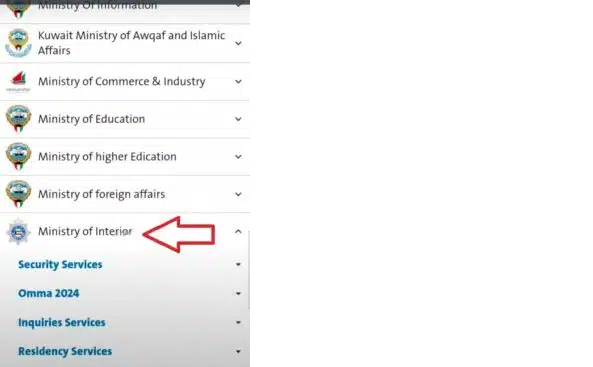
Step 4: Choose Ministry of Interior
Scroll through the list and select “Ministry of Interior.”
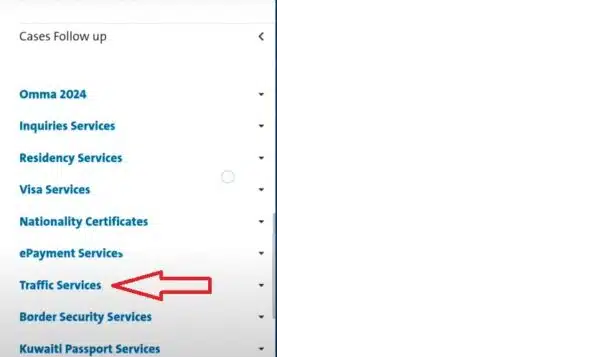
Step 5: Select “Traffic Services”
Under MOI services, tap on “Traffic Services.”
Step 6: Tap “Traffic Violations”
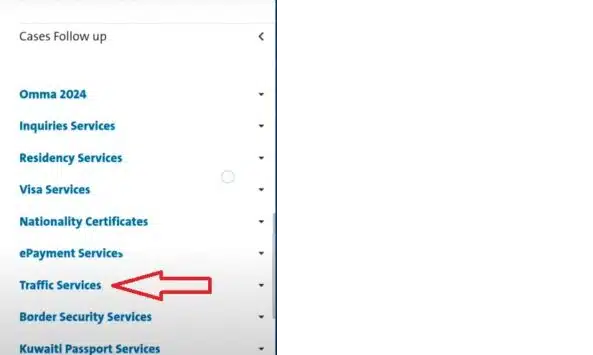
Choose “Traffic Violations → Pay Traffic Violation.”
Step 7: Continue to Payment
Click “Continue.”
Select the person or entity to whom the fines belong:
- Yourself
- Family member
- Company
- Sponsored employee
Step 8: Enter Payment Details
Enter your card information for payment.
Step 9: Submit the Payment
Click “Submit.” A digital receipt will appear inside the app. This method is one of the fastest ways to settle Kuwait traffic fine online.
3. Kuwait Traffic Fine Payment via MOI Mobile App
The MOI mobile app offers yet another safe and reliable method to check and pay Kuwait traffic fine online directly from your smartphone.
How to Pay Traffic Fines Using MOI App
Step 1: Download MOI App
Available on Google Play and Apple App Store.
Step 2: Sign in to Your Account
Log in using your credentials. If you don’t have an account, register easily within the app.
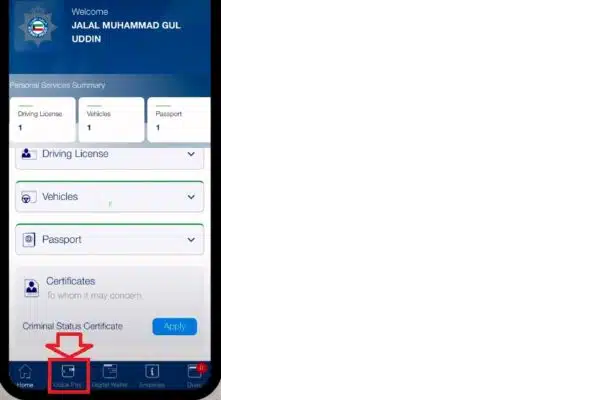
Step 3: Select “Quick Pay”
On the bottom menu, tap “Quick Pay.”
Step 4: Click “Traffic Violations”
Choose “Traffic Violations” from the list.
Step 5: Choose Inquiry Type
Select whether you’re checking for:
- Individuals
- Companies
Step 6: Click “Enquire”

Your unpaid fines will appear instantly.
Step 7: Select the Violation
Choose the violation(s) you want to pay.
Step 8: Proceed to Payment
Click “Pay,” enter your card details, and pay.
Step 9: Confirmation
A confirmation will appear on the screen, indicating that your Kuwait traffic fine online has been settled.
4. Direct Link to Pay Kuwait Traffic Fines
You can instantly check and pay fines using the direct official link:
👉 MOI Kuwait Traffic Violations Portal (moi.gov.kw)
Select your category, enter the required details, view your violations, and complete payment with your debit or credit card.
5. Important Notes About Paying Traffic Fines in Kuwait
- All traffic fines must be paid before renewing your vehicle registration or residency.
- Certain violations, such as major accidents, cannot be paid online.
- Company vehicles require corporate login credentials.
- Payments via Sahel and MOI apps are secure and instant.
- Always save or screenshot your payment receipt.
- Some fines may increase if not paid on time.
- The MOI website is recommended for the fastest system updates.
- Paying Kuwait traffic fine online avoids delays in official procedures.
6. Frequently Asked Questions (FAQs)
1. Can I check my traffic fines using my Civil ID?
Yes, you can check fines using your Civil ID through the MOI website, Sahel app, or MOI app.
2. Can I pay using a non-Kuwaiti bank card?
In most cases, yes. As long as the card supports international online payments.
3. Do companies have a different method?
Companies can pay using the MOI website or app by selecting “Company” in the category.
4. How long does it take for the fine to clear after payment?
It is usually updated instantly in the MOI system.
5. Can I pay for someone else’s traffic violations?
Yes, if you have their Civil ID or vehicle details.
Conclusion
Kuwait has made it incredibly convenient to handle traffic violations with multiple digital options that allow residents and citizens to check and pay Kuwait traffic fine online quickly, securely, and without visiting physical offices. Whether you prefer using the MOI website, the Sahel app, or the MOI mobile app, the whole process can be completed in just a few minutes. Settling traffic fines on time also helps avoid penalties, delays in residency renewal, or vehicle registration issues. The modern online payment system is reliable, safe, and accessible anytime, helping everyone manage their traffic responsibilities efficiently.
കുവൈറ്റ് ട്രാഫിക് ഫൈൻ ഓൺലൈൻ പേയ്മെന്റ് (2025) – സമ്പൂർണ്ണ ഗൈഡ്
കുവൈറ്റ് ആഭ്യന്തര മന്ത്രാലയം (MOI) ഏർപ്പെടുത്തിയ ഡിജിറ്റൽ സംവിധാനങ്ങൾ വഴി ട്രാഫിക് പിഴ അടയ്ക്കുന്നത് ഇപ്പോൾ വളരെ ലളിതമാണ്. പ്രധാനമായും മൂന്ന് വഴികളിലൂടെയാണ് ഇത് ചെയ്യാൻ സാധിക്കുക:
- MOI (ആഭ്യന്തര മന്ത്രാലയം) വെബ്സൈറ്റ്
- സാഹെൽ (Sahel) ഗവൺമെന്റ് ഏകീകൃത മൊബൈൽ ആപ്പ്
- MOI മൊബൈൽ ആപ്പ്
1. MOI വെബ്സൈറ്റ് വഴി ട്രാഫിക് പിഴ അടയ്ക്കുന്ന വിധം
ട്രാഫിക് ഫൈൻ പരിശോധിക്കുന്നതിനും അടയ്ക്കുന്നതിനുമുള്ള ഏറ്റവും സാധാരണവും എളുപ്പമുള്ളതുമായ മാർഗ്ഗമാണിത്. വ്യക്തികൾക്കും കമ്പനികൾക്കും ഈ വെബ്സൈറ്റ് ഉപയോഗിക്കാം.
ഘട്ടം ഘട്ടമായുള്ള നിർദ്ദേശങ്ങൾ
ഘട്ടം 1: ട്രാഫിക് വയലേഷൻ പേയ്മെന്റ് പോർട്ടൽ സന്ദർശിക്കുക
- MOI-യുടെ ഔദ്യോഗിക ഇ-സർവീസ് പോർട്ടൽ സന്ദർശിക്കുക.
- (പരിശോധനയിൽ, MOI വെബ്സൈറ്റ് > E-Services > Traffic > Traffic Violations എന്ന റൂട്ടാണ് പിന്തുടരേണ്ടത്.)
ഘട്ടം 2: നിങ്ങളുടെ വിഭാഗം തിരഞ്ഞെടുക്കുക
- പിഴ ആർക്കുള്ളതാണെന്ന് തിരഞ്ഞെടുക്കുക:
- Individuals (വ്യക്തിഗത പിഴ): താമസക്കാർക്കും പൗരന്മാർക്കും.
- Company / Establishment (കമ്പനിയുടെ പിഴ): ബിസിനസ് വാഹനങ്ങൾക്കുള്ള പിഴ അടയ്ക്കാൻ.
ഘട്ടം 3: വിവരങ്ങൾ നൽകുക
- നിങ്ങൾ തിരഞ്ഞെടുത്ത വിഭാഗം അനുസരിച്ച് ആവശ്യമായ വിവരങ്ങൾ നൽകുക:
- Individuals: നിങ്ങളുടെ സിവിൽ ഐഡി (Civil ID) നമ്പർ നൽകുക.
- Company: കമ്പനിയുടെ സിവിൽ ഐഡി അല്ലെങ്കിൽ കമ്പനി നമ്പർ നൽകുക.
ഘട്ടം 4: ‘Enquire’ (അന്വേഷിക്കുക) ക്ലിക്കുചെയ്യുക
- നിങ്ങളുടെ പേരിൽ/കമ്പനിയുടെ പേരിൽ അടയ്ക്കാത്ത എല്ലാ ട്രാഫിക് പിഴകളും (Unpaid Violations) അപ്പോൾ സ്ക്രീനിൽ കാണാം.
- ശ്രദ്ധിക്കുക: കോടതിയിലേക്ക് റഫർ ചെയ്ത ഗുരുതരമായ ചില പിഴകൾ (‘Non-Payable’ ആയി കാണിക്കും) ഓൺലൈനായി അടയ്ക്കാൻ സാധിക്കുകയില്ല.
ഘട്ടം 5: പിഴകൾ തിരഞ്ഞെടുക്കുക
- അടയ്ക്കാൻ ഉദ്ദേശിക്കുന്ന പിഴകൾ തിരഞ്ഞെടുക്കുക. ഇവിടെ ലംഘനത്തിന്റെ തീയതി, തരം, സ്ഥലം, പിഴത്തുക എന്നിവ കാണാൻ സാധിക്കും.
ഘട്ടം 6: ‘Pay’ (പണം അടയ്ക്കുക) ക്ലിക്കുചെയ്യുക
ഘട്ടം 7: പേയ്മെന്റ് വിവരങ്ങൾ നൽകുക
- നിങ്ങൾ സുരക്ഷിതമായ K-Net അല്ലെങ്കിൽ ക്രെഡിറ്റ് കാർഡ് പേയ്മെന്റ് ഗേറ്റ്വേയിലേക്ക് റീഡയറക്ട് ചെയ്യപ്പെടും.
- നിങ്ങളുടെ ഡെബിറ്റ്/ക്രെഡിറ്റ് കാർഡ് വിവരങ്ങൾ (കാർഡ് നമ്പർ, കാലാവധി, CVV) നൽകുക.
ഘട്ടം 8: പേയ്മെന്റ് പൂർത്തിയാക്കുക
- ‘Submit’ ക്ലിക്ക് ചെയ്ത് പേയ്മെന്റ് പൂർത്തിയാക്കുക. പേയ്മെന്റ് സ്ഥിരീകരിച്ചുകൊണ്ടുള്ള (Confirmation) ഒരു ഡിജിറ്റൽ രസീത് (Receipt) നിങ്ങൾക്ക് ലഭിക്കും. ഇത് സേവ് ചെയ്യുക അല്ലെങ്കിൽ പ്രിന്റ് എടുക്കുക.
2. സാഹെൽ (Sahel) ആപ്പ് വഴി പിഴ അടയ്ക്കുന്ന വിധം
കുവൈറ്റിലെ എല്ലാ സർക്കാർ സേവനങ്ങളെയും ഒരിടത്ത് കൊണ്ടുവരുന്ന ഏകീകൃത മൊബൈൽ ആപ്ലിക്കേഷനാണ് സാഹെൽ. ഇത് പിഴ അടയ്ക്കുന്നതിനുള്ള ഏറ്റവും വേഗമേറിയ മാർഗ്ഗമാണ്.
ഘട്ടം ഘട്ടമായുള്ള നിർദ്ദേശങ്ങൾ
ഘട്ടം 1: സാഹെൽ ആപ്പ് ഡൗൺലോഡ് ചെയ്ത് ലോഗിൻ ചെയ്യുക
- Google Play Store-ൽ നിന്നോ Apple App Store-ൽ നിന്നോ ആപ്പ് ഡൗൺലോഡ് ചെയ്യുക.
- നിങ്ങളുടെ സിവിൽ ഐഡി ഉപയോഗിച്ച് ലോഗിൻ ചെയ്യുക, തുടർന്ന് OTP വഴി ഓതന്റിക്കേഷൻ പൂർത്തിയാക്കുക.
ഘട്ടം 2: ‘Services’ (സേവനങ്ങൾ) വിഭാഗത്തിലേക്ക് പോകുക
- സ്ക്രീനിന്റെ താഴെയുള്ള ‘Services’ ടാബിൽ ക്ലിക്കുചെയ്യുക.
ഘട്ടം 3: ‘Ministry of Interior’ തിരഞ്ഞെടുക്കുക
- മന്ത്രാലയങ്ങളുടെ ലിസ്റ്റിൽ നിന്ന് ആഭ്യന്തര മന്ത്രാലയം (MOI) തിരഞ്ഞെടുക്കുക.
ഘട്ടം 4: ‘Traffic Services’ (ട്രാഫിക് സേവനങ്ങൾ) തിരഞ്ഞെടുക്കുക
- MOI സേവനങ്ങളിൽ നിന്ന് ‘Traffic Services’ തിരഞ്ഞെടുക്കുക.
ഘട്ടം 5: ‘Traffic Violations’ (ട്രാഫിക് ലംഘനങ്ങൾ) തിരഞ്ഞെടുക്കുക
- Traffic Violations > Pay Traffic Violation എന്ന ക്രമത്തിൽ തിരഞ്ഞെടുക്കുക.
ഘട്ടം 6: അടയ്ക്കാൻ ഉദ്ദേശിക്കുന്ന വ്യക്തിയെ/സ്ഥാപനത്തെ തിരഞ്ഞെടുക്കുക
- നിങ്ങൾക്കോ, കുടുംബാംഗങ്ങൾക്കോ, അല്ലെങ്കിൽ കമ്പനിക്കോ വേണ്ടിയുള്ള പിഴ അടയ്ക്കാൻ തിരഞ്ഞെടുക്കുക.
ഘട്ടം 7: പേയ്മെന്റ് പൂർത്തിയാക്കുക
- കാണിക്കുന്ന പിഴകൾ പരിശോധിച്ച്, അടയ്ക്കേണ്ടത് തിരഞ്ഞെടുത്ത്, കാർഡ് വിവരങ്ങൾ നൽകി പേയ്മെന്റ് പൂർത്തിയാക്കുക. രസീത് ആപ്പിനുള്ളിൽ തന്നെ ലഭ്യമാകും.
3. MOI മൊബൈൽ ആപ്പ് വഴി പിഴ അടയ്ക്കുന്ന വിധം
MOI-യുടെ സ്വന്തം മൊബൈൽ ആപ്പും ഈ സേവനം നൽകുന്നുണ്ട്.
ഘട്ടം ഘട്ടമായുള്ള നിർദ്ദേശങ്ങൾ
- ആപ്പ് ഡൗൺലോഡ് ചെയ്ത് ലോഗിൻ ചെയ്യുക.
- താഴെയുള്ള മെനുവിൽ നിന്ന് ‘Quick Pay’ തിരഞ്ഞെടുക്കുക.
- ലിസ്റ്റിൽ നിന്ന് ‘Traffic Violations’ തിരഞ്ഞെടുക്കുക.
- ഇൻക്വയറി തരം (Individuals / Companies) തിരഞ്ഞെടുക്കുക.
- ആവശ്യമായ വിവരങ്ങൾ നൽകി ‘Enquire’ ക്ലിക്ക് ചെയ്യുക.
- പിഴകൾ തിരഞ്ഞെടുത്ത്, ‘Pay’ ബട്ടൺ വഴി പേയ്മെന്റ് പൂർത്തിയാക്കുക.
📝 പ്രധാനപ്പെട്ട കാര്യങ്ങൾ (2025)
- നിർബന്ധമായ പേയ്മെന്റ്: നിങ്ങളുടെ വാഹന രജിസ്ട്രേഷൻ പുതുക്കുന്നതിനോ അല്ലെങ്കിൽ റസിഡൻസി പുതുക്കുന്നതിനോ (വിസ പുതുക്കൽ) മുമ്പ് എല്ലാ ട്രാഫിക് പിഴകളും അടച്ചുതീർത്തിരിക്കണം.
- ഓൺലൈനായി അടയ്ക്കാൻ സാധിക്കാത്ത പിഴകൾ: ഗുരുതരമായ അപകടങ്ങൾ പോലുള്ള വലിയ കേസുകളിലെ പിഴകളും, കോടതിയിലേക്ക് റഫർ ചെയ്ത പിഴകളും നേരിട്ട് ട്രാഫിക് ഡിപ്പാർട്ട്മെന്റിൽ പോയി അടയ്ക്കേണ്ടിവരും.
- അപ്ഡേറ്റ് സമയം: പേയ്മെന്റ് പൂർത്തിയാക്കിയ ശേഷം, നിങ്ങളുടെ റെക്കോർഡിൽ നിന്ന് പിഴ നീങ്ങാൻ സാധാരണയായി തൽക്ഷണം (Instant) അല്ലെങ്കിൽ പരമാവധി 15 മിനിറ്റ് വരെ സമയം എടുക്കും.
- രസീത്: പേയ്മെന്റ് സ്ഥിരീകരിക്കുന്ന ഡിജിറ്റൽ രസീത് എപ്പോഴും സുരക്ഷിതമായി സൂക്ഷിക്കുക.